
Stakeout
Wildcard Software LLCTravel & Local
4.835.00 Reviews
- Version
- 6.1.0
- Installs
- 10.00K
- Age Rating
- Everyone
Screenshots

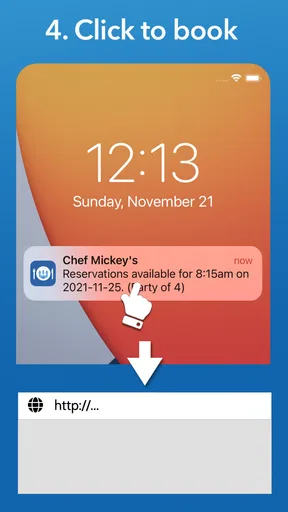
Our Review of Stakeout
 Analysis by Appyee
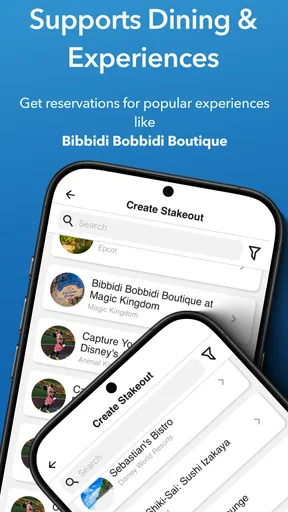
When I plan a day at a Disney park, the hardest part is often not choosing a ride; it is making a meal plan that can bend around a busy schedule. Stakeout is built for that particular travel problem: it focuses on dining alerts for Disney Parks rather than trying to be an all-purpose trip planner. I see the appeal most clearly when a meal reservation would meaningfully shape the day, but I would not treat it as a replacement for every other park-planning tool.
What to expect from the alert-focused approach
The useful promise here is focus. Instead of asking one app to handle maps, itineraries, and every park detail, I can use a dining-alert tool for one narrow task: keeping an eye out for an opening that suits my plans. That can be especially helpful when a preferred meal time is unavailable at first and I would rather not keep checking manually throughout the day.
There is an important distinction between an alert and a reservation. An alert can help me notice an opportunity; it does not make the decision for me or guarantee that a table will remain available while I respond. I would still be ready to check the booking details and act promptly. For a group with fixed meal times, that quick follow-through matters more than any elaborate itinerary.
I would also decide in advance what counts as an acceptable alternative. If I only want one restaurant at one exact time, there may be little value in being notified about openings that do not fit. Being flexible about a nearby time, a different day, or a second-choice venue gives an alert service more room to be useful. That is a practical planning choice, not a setting I assume the app offers.
A realistic park-day use case
Imagine I am visiting with family and we hope to sit down for a meal during the middle of the day. The first-choice time is not working out, but we do not want to spend the morning refreshing a booking page while everyone is trying to enjoy the park. I would use Stakeout as a way to watch for a better opening, while keeping a backup meal plan in mind and continuing to check the official booking route before committing.
This kind of setup is most useful when the meal is important but the day can still adapt. A couple who can shift lunch a little may get more value from alerts than a group whose schedule depends on a strict nap or showtime. I would compare the alert opportunity against travel time inside the park, too: a table that looks ideal on a clock may be inconvenient if it pulls the group far away from where they need to be next.
How it fits beside other planning options
Compared with manually revisiting the usual reservation channel, an alert-focused app may reduce the attention that task demands. Compared with a broad park itinerary or map app, it has a narrower job and should be judged on whether it helps with dining availability rather than how many planning tools it bundles together. I would keep those roles separate: use a park guide for navigation and schedules, and use Stakeout for the specific dining search it is meant to support.
There is a trade-off in that specialization. If I already have a flexible meal plan, or if I am content with walk-up dining and whatever is available, a dedicated alert app may add little to my day. It is also not a substitute for checking reservation terms, party details, or the final booking itself. I would verify those through the appropriate official channel before changing plans.
Using Stakeout in practice
Hey there, fellow app enthusiast! So, I’ve been diving into this cool app called Stakeout, and I gotta say, it's been quite the experience. Whether you're a fan of strategy games or just love keeping your brain active, this app might just be your next obsession. Let me break it down for you.
First off, installing Stakeout was a breeze. Available on both Android and iOS, you can find it easily on the app store of your choice. Once downloaded, I was welcomed with a sleek interface that’s both user-friendly and visually appealing. The app sets the mood right from the start with its intriguing design and smooth navigation.
The game revolves around strategy and planning, which are my jam. It has this unique way of pulling you into its world, making you feel like a mastermind plotting the next big heist. But don’t worry, it’s all in good fun, and no actual laws are broken!
Speed, stability, and the real task
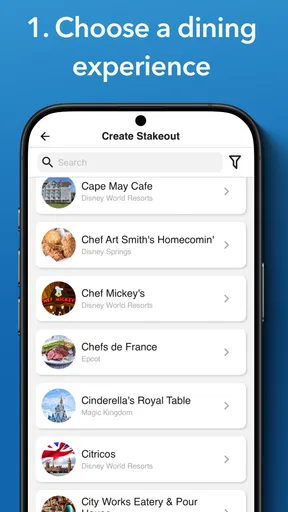
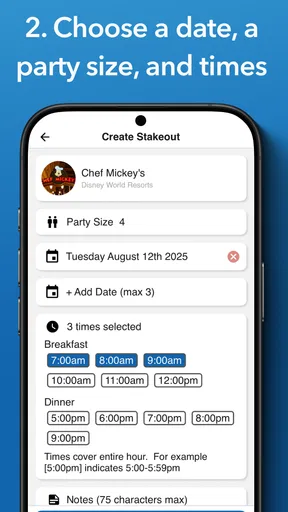
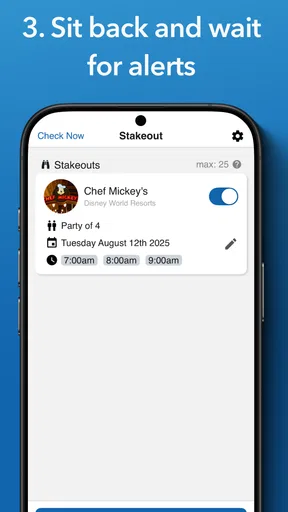
Because Stakeout is a dining-alert app, I would judge its speed by how easily I can set up and review the alerts I need, not by game-like animation or visual effects. I found the interface straightforward to move through, which helps when I want to get a task done and return to planning the rest of the day. An alert is only useful if I can respond while an opening is still relevant, so I would keep notifications enabled where appropriate and avoid assuming that seeing an alert reserves anything automatically.
At a busy moment, such as coordinating a group’s plans between attractions, the main strain is likely to be on my attention rather than on the device. I would choose a few realistic dining targets instead of trying to track every theoretical option. That keeps the search manageable and makes it easier to decide quickly whether a possible time works for the party. If no suitable opening appears, I would switch to the backup plan rather than letting repeated checks take over the day.
Reliability depends on the follow-through
I would treat any alert as a prompt to verify availability, not as a promise that a reservation is secured. Dining openings can be time-sensitive, and the final booking step still matters. A sensible routine is to check the details as soon as practical, confirm the party and time through the booking process, and then stop watching that particular opening once plans are settled. That workflow avoids confusing a notification with a completed reservation.
If an alert is missed or arrives at an inconvenient time, I would not build the entire day around the assumption that another one will come along. The more robust approach is to keep a viable alternative, especially when traveling with children or coordinating a fixed schedule. This is where the app’s focused role is both its strength and its limit: it can help me monitor dining possibilities, but I remain responsible for adapting the rest of the itinerary.
Who benefits, and what to check first
Stakeout makes the most sense for visitors who care about a particular dining experience and can adjust the timing if availability changes. It is less compelling for travelers who prefer spontaneous meals, already have a reservation that suits them, or do not want another notification-driven task during a park visit. Before relying on it, I would make sure my chosen options are genuinely acceptable and that everyone in the group agrees on a backup. That small conversation can prevent a last-minute alert from turning into a debate.
Wildcard Software LLC makes this free Travel & Local app, with a 4.8 average from 344 ratings and more than 10K installs. It is rated for Everyone, and the current version is 6.1.0; in-app purchases range from $9.99 to $19.99 per item. I would look at the purchase details in the app before paying, and decide whether the alert workflow is valuable enough for my own trip rather than assuming that every visitor needs a paid option. The app was released on January 11, 2022, and lists a minimum OS of 7.0.
My take for a Disney dining plan
For me, the best reason to try Stakeout is simple: I want help keeping track of dining opportunities without repeatedly interrupting the rest of my planning. Its focused purpose makes it easier to understand where it might fit, while the need to act on alerts and verify a booking keeps expectations realistic. I would use it alongside a backup meal idea, not as the single point of failure for a carefully timed day.
Hey there, fellow app enthusiast! So, I’ve been diving into this cool app called Stakeout, and I gotta say, it's been quite the experience. Whether you're a fan of strategy games or just love keeping your brain active, this app might just be your next obsession. Let me break it down for you.
First off, installing Stakeout was a breeze. Available on both Android and iOS, you can find it easily on the app store of your choice. Once downloaded, I was welcomed with a sleek interface that’s both user-friendly and visually appealing. The app sets the mood right from the start with its intriguing design and smooth navigation.
The game revolves around strategy and planning, which are my jam. It has this unique way of pulling you into its world, making you feel like a mastermind plotting the next big heist. But don’t worry, it’s all in good fun, and no actual laws are broken!
Gameplay Mechanics
Let’s talk about the gameplay because that’s where the magic truly happens. You start off with a tutorial that’s super helpful, especially if you’re new to strategy games. The game does a fantastic job at easing you in, step by step, ensuring that you’re never overwhelmed by its features.
The core of the game is all about planning and executing heists. You have to assemble a team, gather intel, and pick the right equipment for the job. Each mission is like a puzzle waiting to be solved, and trust me, the satisfaction you get from pulling off a flawless job is next level.
Features That Stand Out
One of my favorite features is the diversity in missions. The variety keeps things fresh and exciting. Whether you’re sneaking into a high-security vault or intercepting a convoy, each mission has its own set of challenges and rewards. You can’t just use the same tactics every time, which keeps you on your toes.
The app also offers multiplayer options, where you can team up with friends or other players. This adds a layer of competition and camaraderie that’s hard to resist. Who doesn’t love a little friendly rivalry?
"Plan your heist, execute with precision, and escape without a trace."
Graphics and Sound
Let’s not forget about the graphics and sound, which are just as important in creating an immersive experience. The visuals are top-notch, with detailed environments that make each mission feel alive. The sound effects and background music add to the tension, making you feel like you’re part of a spy thriller.
Every little detail, from the footsteps to the alarms, is crafted to enhance the gameplay experience. It’s these small touches that really set Stakeout apart from other strategy games.
Final Thoughts
After spending some quality time with Stakeout, I can honestly say it’s a gem in the world of strategy games. It’s challenging yet rewarding, and it constantly pushes you to think outside the box. If you're into games that test your strategic thinking and offer a bit of thrill, then this app should definitely be on your radar.
Ready to step into the shoes of a master strategist? Download Stakeout and start planning your next big heist. Just remember, in the world of strategy, the best plan is the one nobody sees coming!
Verdict
Strengths of Stakeout
- Intuitive user interface for easy navigation.
- Real-time notifications keep you updated.
- Customizable settings for personalized use.
- Seamless integration with other platforms.
- Efficient customer support for quick help.
Limitations of Stakeout
- Limited free features in basic version.
- Occasional lag on older devices.
- Requires stable internet connection.
- Ads can be intrusive at times.
- Some features locked behind paywall.
Similar Picks in This Category
View All
Google Maps
Google LLC3.4

Google Maps Go
Google LLC4.1

Booking.com: Hotels & Travel
Booking.com Hotels & Vacation Rentals4.8

Google Earth
Google LLC3.8

Skyscanner Flights Hotels Cars
Skyscanner Ltd4.8

trivago: Compare hotel prices
trivago N.V.4.4
Frequently Asked Questions
What is Stakeout and what does it offer?
Stakeout is a real-time strategy game available on both Android and iOS, where players assume the role of a detective trying to solve intricate cases. The game combines puzzle-solving elements with engaging storylines, offering a unique blend of strategy and mystery. Players can expect immersive graphics and a dynamic user interface.
Is Stakeout free to download and play?
Stakeout is free to download, but it includes in-app purchases. While the core gameplay is accessible at no cost, players have the option to purchase additional hints, tools, or skip certain levels. These purchases are optional and designed to enhance gameplay for those who wish to progress more quickly.
What are the device requirements for Stakeout?
For Android users, Stakeout requires Android version 6.0 or higher and at least 2GB of RAM. iOS users need iOS 11.0 or later. The game is optimized for both smartphones and tablets, ensuring smooth performance across a range of devices. Adequate storage space is also necessary for updates and additional content downloads.
How does Stakeout ensure user privacy and data security?
Stakeout prioritizes user privacy by implementing robust security measures. The app collects minimal personal data, primarily for account creation and gameplay personalization. Users can review the privacy policy within the app settings, which details data usage and protection practices. Regular updates ensure compliance with the latest data protection regulations.
Can Stakeout be played offline?
Stakeout requires an internet connection to download new content and updates, as well as to participate in online leaderboards and events. However, once the initial download and necessary updates are completed, certain levels can be played offline. This allows users to enjoy the game even without a constant internet connection.
